Background
I've always wanted to learn to program in Assembly. But, having looked at some of it's niches (reversing, performance programming) they didn't look too attractive to me.
That is until some years back when I watched Ben Eater's video series on "8-bit breadboard computers" and the more close to the topic of this post his "Build a 65c02-based computer from scratch". Where he builds a computer the old-school way, starting from a 6502 CPU DIP chip, with no code or Operative System to begin with. Adding software support for periphericals one at the time.
Well, I don't own a 6502. But … I managed to scavange a 8042 from an old motherboard!

"A 8042?" I hear you say. YES!. It's a MCU (Microcontroller) (aka a CPU+ROM+RAM) with the peculiarity that it can also act as a CPU, by reading a program from an external ROM.
Hardware
MCU
The 80C42, from the Intel's MCS-48 family of chips, was made by NEC.
This variant was intended to work as a slave MCU, so many of it's pins are supposed to receive orders from it's master. But can work for our needs.

EEPROM
Now we need a place to put our program. Since the MCU internal ROM is programable ONLY by using a special programer, that uses a different supply voltages. We are going to use an external EEPROM.
A SSTEE010-150.
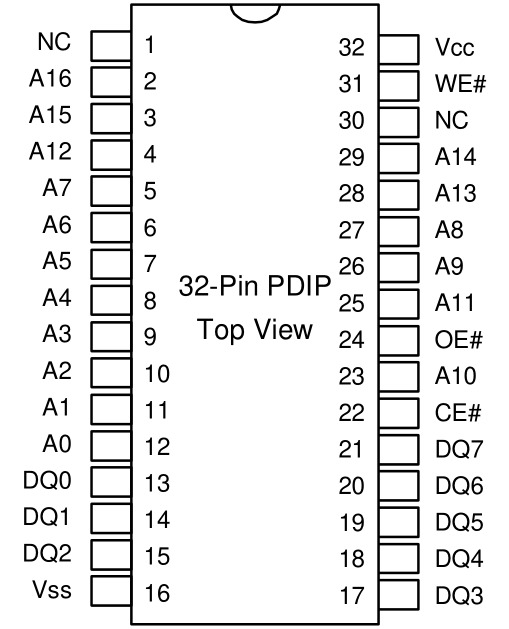
Wiring
Among the few resources online, there is this one, where it describes 2 different ways to setup this chip for external EEPROM access.
- Connect directly the CPU and the EEPROM
- Connect indirectly the CPU through a 74374, a positive edge flip-flop. This gives you access to IO ports on downward SYNC cycles.
For this blog entry I will use 1)
Also, for this first program I am going to drive it step by step, instruction by instruction, by using it's SS input pin. Instead of connecting it to a crystal oscillator. That will allow me to later monitor it's progress with an Arduino hooked to each BUS and the SYNC pin.

Programming: Blink LED
Background
Programming, in this chip means: Writting bytecode into the EEPROM. That then the 8042 can read an interpret as instructions.

These are some examples of opcodes with their correspont bytecodes that i took from "MCS-48 Assembly Language Reference Card".
This means if I put 0xF8 on a EEPROM memory address, the CPU will run MOV A,R0, (aka it will "move" the accumulator value to "Register 0").
ASM
Now, we don't want to write bytecode by hand in hexadecimal, for that we will use the asxxxx assembler.
We start with some boilerplate for the assembler.
.ifdef  .__.CPU. ; if we are using as8048 this is defined
.8041
.area   CODE    (ABS)
.endif           ; .__.CPU.
CPU starts reading at address zero (0x0). We put there a jump to where is our program. Skipping some reserve addresss for other operations.
        .org 0x0
reset:
        jmp entry
Our main program startes here.
        .org 0x10
entry:
        mov  A,    #0x0A ; 00001010
        outl P2,   A
        call delay

        mov  A,    #0x15 ; 00010101
        outl P2,   A
        call delay

        jmp  entry       ; repeat main loop
Finally the definition of delay. Basically 2 nested loops with nop on it's deepest level.
delay:  mov  R0, #255   ; init outer loop counter
delay2: mov  R1, #255   ; init inner loop counter
delay1:
        nop
        nop
        nop
        nop
        djnz R1, delay1 ; dec inner count, continue if not zero
        djnz R0, delay2 ; dec outer count, continue if not zero
        ret             ; return to caller
That's it!
The ROM output
Ok, long story short, I copied this makefile elsewhere to build the .bin image I want.
default: blink.bin

# assemble with as8048
%.hex: %.asm
        as8048 -l -o $<
        aslink -i -o $(<:.asm=.rel)

# convert to bin
%.bin: %.hex
        hex2bin -p 00 -e bin $<
This outputs something like this
00000000  04 10 00 00 00 00 00 00  00 00 00 00 00 00 00 00  |................|
00000010  23 0a 3a 14 1c 23 15 3a  14 1c 04 10 b8 ff b9 ff  |#.:..#.:........|
00000020  00 00 00 00 e9 20 e8 1e  83 00 00 00 00 00 00 00  |..... ..........|
00000030  00 00 00 00 00 00 00 00  00 00 00 00 00 00 00 00  |................|
*
000003f0  00 00 00 00 00 00 00 00  00 00 00 00 00 00 00 9e  |................|
00000400
Now we could write this .rom to our EEPROM with a programmer.
Testing
aka Confirming the CPU is doing what is supposed to do
The Setup
My testing setup consists on 2 additional parts.
- I use the SS (Single Step) input pin on the 8042. That allows me to use a momentary button to advance one instruction at the time. Instead of going at the speed of the clock. This button needs to be debounced, I used a 555 for that.
- I use the trick Ben Eater used for his 6502 series. And that is use an Arduino as some sort of digital analyzer. I use it to monitor what is on the DATA and ADDRESS bus as I Single Step.
Failure and …
So here is the image.
$ xxd blink.rom
00000000: 1535 0410 0000 0000 0000 0000 0000 0000  .5..............
00000010: 235f 3a14 1c23 af3a 141c 0410 b955 b863  #_:..#.:.....U.c
00000020: 0000 e820 e91e 8300 0000 0000 0000 0000  ... ............
00000030: 0000 0000 0000 0000 0000 0000 0000 0000  ................
...
And here is some Serial debug output with the address, data in hexadecimal, and data in hexadecimal and binary.
0000: 1a 0001 1010
0001: 3a 0011 1010
0002: 08 0000 1000
0003: 10 0001 0000
We start at address 0x00, and we advance one byte at the time. That seems good.
0010: 23 0010 0011
0011: 5f 0101 1111
0012: 35 0011 0101
Woah there, we jumped to address 10 (?). Oh right, the jmp entry.
07ff: 00 0000 0000
Ok, some random (?) reading.
0013: 18 0001 1000
0014: 1c 0001 1100
001c: b6 1011 0110
001d: 5a 0101 1010
001e: b4 1011 0100
001f: 63 0110 0011
Wait something is wrong here. The second nibble of data is not always matching the expected data in memory.
For example the first reading, was:
0000: 1a
But it should have been:
0000: 15
Let's check the cables….yup..I got the wiring of this improvised sniffer wrong. Fixing…
But before that let's see a bit more.
0020: 00
0021: 00
0022: e4 1110 0100
0023: 20 0010 0000
0020: 00
0021: 00
0022: e4
0023: 20
Ok, we are looping.
Some wiring fixes and it worked blinked!.
Future Work
I want do more with this. I was asked: "What is the difference between the 8042 and the Z80?". And honestly all I can talk is about specs.
- No RAM expansion.
- Poor instruction set.
But what does this REALLY mean?.
Let's try run something more "real" on it!
Resources
A special section is dedicated to honour some of the resources I found online. There are a few more (not many). But these resulted the more useful, accurate and "modern". Two of these resources went offline while writting this blog entry … so before I bitrot myself, here are the waybackmachine links:
- mcs-48 detailed overview
- project: 8041 clock
- project: 8041 leds
- wirings & code to output for Port1 and Port2 with 74xxx latch
- project: 8048 temperature sensor